Realistic Lens Flare: Elevating Digital Art with Cinematic Light
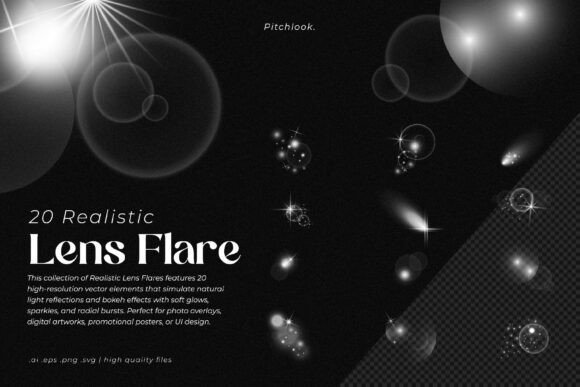
There is a specific kind of magic that happens when light interacts with a camera lens, creating those streaks, hexagons, and soft glows that we often associate with high-budget cinematography. For years, designers tried to replicate this using basic gradients, often ending up with results that felt flat or "plasticky." The Realistic Lens Flare collection changes the game entirely. This isn't just a set of random shapes; it is a premium collection of 20 distinct, high-resolution vector elements designed to capture the organic beauty of natural light reflections and bokeh effects. If you are looking to add depth, warmth, and a professional cinematic finish to your work, understanding how to utilize these assets is crucial for standing out in a crowded visual landscape.
The Anatomy of Cinematic Light
When we talk about a "realistic" flare, we are discussing texture and complexity. A standard digital starburst is uniform and boring. However, the elements within the Realistic Lens Flare toolkit are crafted with soft glows, intricate sparkles, and radial bursts that mimic the physics of actual optics. They feature subtle gradients that blend seamlessly into your artwork rather than sitting on top of it like a sticker. This distinction is vital for modern typography and graphic design. Whether you are working on a moody movie poster or a vibrant social media campaign, the style of these flares provides that "golden hour" aesthetic. It is a versatile asset that bridges the gap between static imagery and dynamic motion, making it an indispensable part of your design assets library.
Strategic Applications for Designers and Brands
Knowing when and where to deploy a lens flare is just as important as the asset itself. These elements are not just for sci-fi posters anymore. They have found a home in various sectors of the industry, from UI design to packaging.
Photo Overlays and Digital Art
For photographers and digital artists, the primary value lies in photo overlays. Imagine a portrait shot that feels a bit under-lit or lacks atmosphere. By layering a soft, warm flare from this collection, you can instantly guide the viewer's eye and add emotional weight to the image. It works exceptionally well for creating that high-end editorial look often seen in fashion magazines or album covers. Because these are vector elements available in AI, EPS, PNG, and SVG formats, they scale without losing quality, ensuring your print-ready designs remain crisp.
Video Production and Motion Graphics
In the realm of video production, lens flares are a staple for transitions and emphasis. However, using stock footage overlays can often result in compression artifacts. Using the SVG or high-res PNG files from the Realistic Lens Flare pack allows motion graphic artists to animate the flare properties—scale, opacity, and rotation—with smooth precision. This is perfect for kinetic typography intros or adding a spark of life to corporate explainer videos.
Branding and UI Design
It might seem counterintuitive to use a lens flare in User Interface design, but when done sparingly, it creates a striking focal point. Think about a "Subscribe" button on a landing page or a feature highlight in a mobile app. A subtle radial burst behind a call-to-action can increase click-through rates by drawing the eye naturally. For brand identity, particularly for tech startups, music labels, or luxury goods, incorporating these light effects into logo design or promotional posters communicates innovation and premium quality without saying a word.
Enhancing Visual Hierarchy and Engagement
Visual hierarchy is about controlling the order in which the human eye perceives information. Color, size, and contrast are the usual suspects, but light is a powerful, often overlooked tool. By placing a Realistic Lens Flare element near your headline or key subject, you create a natural vignette effect. The eye is drawn to the light source, and consequently, the text or image adjacent to it.
This technique significantly boosts audience engagement. In the context of social media graphics, where you have roughly two seconds to capture attention, a well-placed bokeh effect or sparkle can stop the scroll. It adds a layer of professionalism that separates amateur work from polished commercial design. It signals to the viewer that care was taken in the production of the content, which subconsciously builds trust in the brand.
Practical Implementation and Best Practices
To get the most out of this collection, you need to treat these elements as professional tools, not just decorations. Here is a practical guide on integrating the Realistic Lens Flare into your workflow.
Blending Modes are Key
Never just place a flare on a layer set to "Normal." That is the fastest way to make a design look fake. To achieve that cinematic realism, you must experiment with blending modes. Screen and Linear Dodge (Add) are usually your best friends here, as they remove the black background and leave only the light information. Overlay and Soft Light can be used for more subtle, textured glows that integrate with the underlying image's contrast.
Color Grading and Harmony
While the pack comes with standard light colors, you should always adjust the hue and saturation to match your project's color palette. If your design uses cool blues and teals, shift your flare to match. This consistency is what makes a design feel cohesive. A generic yellow flare on a cool-toned website will look jarring. Use color balance tools to tint the flares so they appear as if they were generated by the environment of your specific scene.
Less is More
The biggest mistake creatives make with light effects is overuse. One strong, intentional flare creates a focal point. Five flares create a mess that obscures the content and hurts readability. If you are designing a poster or a web banner, ask yourself: "Is this flare supporting the message, or is it distracting from it?" Good design is about restraint.
Evaluating File Formats
The inclusion of AI and EPS files makes this collection particularly valuable for vector-heavy workflows, such as Adobe Illustrator. You can expand the vectors, edit the anchor points, and truly make the flare your own. For quick edits in Photoshop or Canva, the PNGs are perfect. Always choose the format that gives you the most control over the final output.
Conclusion
In the end, the Realistic Lens Flare collection is more than just a set of pretty lights; it is a toolkit for storytelling. It allows designers, marketers, and entrepreneurs to evoke specific moods—nostalgia, futurism, romance, or energy—simply through the manipulation of light. By understanding the technical aspects of blending modes and the strategic aspects of visual hierarchy, you can transform a flat design into an immersive visual experience. Whether you are crafting a brand identity, finishing a video edit, or designing a promotional poster, these assets provide the professional polish required to compete in today’s high-definition world.